I’ve been learning about “agentic AI” lately, and along the way I realized I understand things much better when I try to explain them simply — so I thought I’d share what I’m learning in public, in case it helps anyone else who’s trying to make sense of this too.
Here’s one of the first things that made it click for me.
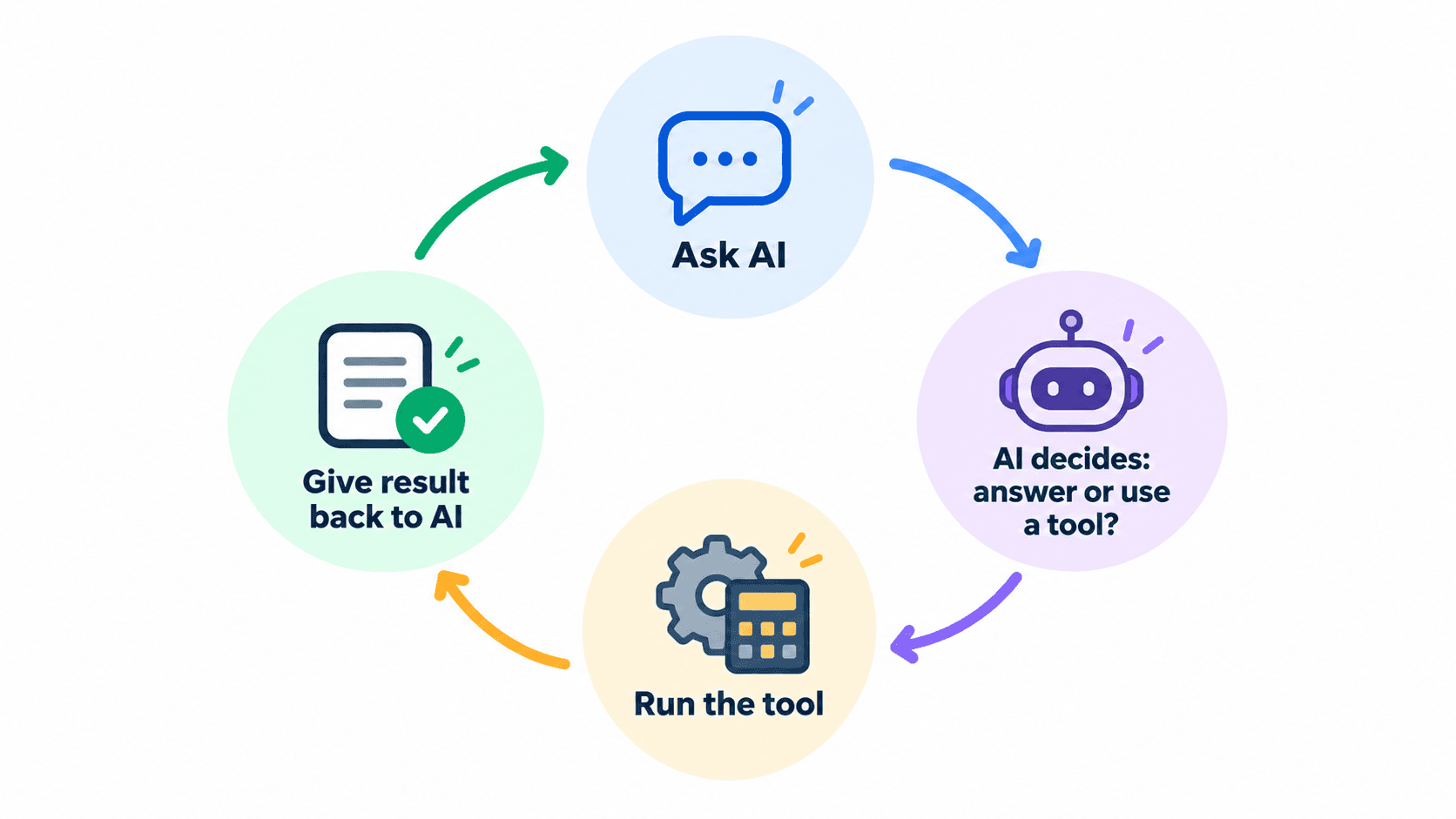
When people say an AI is “agentic,” what they usually mean is: the AI can decide it needs help, ask for that help, get the result, and keep going — all by itself, without a human clicking buttons in between.
That whole back-and-forth has a name: the agent loop. It sounds fancy, but it’s genuinely a small idea. To prove that to myself, I built the simplest possible version of one: a calculator bot. Not because calculators are exciting, but because the math isn’t the point — the loop is.
Full code is on GitHub here: Github link
The problem: AI models can’t actually do math
Here’s something that surprises people: even though it can explain calculus, an AI model isn’t reliably good at doing arithmetic. It’s just predicting text.
So instead of trusting the AI to calculate 47 × 12 itself, the trick is: let the AI ask your code to do it, and hand the answer back. That’s tool use. And the loop that manages this back-and-forth is the agent loop.
The pieces, in plain English
My whole project is one file: src/index.ts. Here’s what’s in it, piece by piece.
1. The actual function that does the work
function calculate(a: number, b: number, operation: string): number {
  switch (operation) {
    case "add": return a + b;
    case "subtract": return a - b;
    case "multiply": return a * b;
    case "divide":
      if (b === 0) throw new Error("Cannot divide by zero");
      return a / b;
    default:
      throw new Error(`Unknown operation: ${operation}`);
  }
}
Nothing AI about this. It’s a plain old function. This is the “tool” — real code that actually does the job.
2. Describing that tool to the AI
The AI can’t see your code. So you have to describe the tool to it — what it’s called, what it needs, what it’s for:
const calculatorTool = {
  functionDeclarations: [
    {
      name: "calculate",
      description: "Perform a mathematical calculation between two numbers.",
      parameters: {
        type: Type.OBJECT,
        properties: {
          a: { type: Type.NUMBER, description: "The first number" },
          b: { type: Type.NUMBER, description: "The second number" },
          operation: { type: Type.STRING, description: "add, subtract, multiply, or divide" },
        },
        required: ["a", "b", "operation"],
      },
    },
  ],
};
Think of this as a menu you hand to the AI: “Here’s what you’re allowed to order, and here’s what I need from you to make it.”
3. The loop itself — this is the whole trick
This is the part that actually makes it an “agent” instead of a regular chatbot:
while (true) {
  const response = await ai.models.generateContent({
    model: "gemini-3.6-flash",
    contents,
    config: { tools: [calculatorTool] },
  });

  const functionCall = response.candidates?.[0]?.content?.parts?.find(
    (part) => part.functionCall
  )?.functionCall;

  // No tool call means the AI has produced the final answer.
  if (!functionCall) {
    console.log(response.text);
    break;
  }

  // Otherwise, run the tool ourselves...
  const result = calculate(
    Number(functionCall.args?.a),
    Number(functionCall.args?.b),
    String(functionCall.args?.operation)
  );

  // ...and hand the result back to the AI, then loop again.
  contents.push({
    role: "user",
    parts: [{ functionResponse: { name: functionCall.name, response: { result } } }],
  });
}
In plain English, this loop is just saying, over and over:
- Ask the AI: “Here’s the conversation so far — what do you want to do?”
- If it gives a normal answer → we’re done, show it and stop.
- If it asks to use a tool → run that tool in real code, and give it the result.
- Go back to step 1, and repeat, until step 2 happens.
That’s it. That’s an agent loop. It’s just a while loop with an if-check for “did the AI ask for a tool, or is it done talking?”
Walking through an actual example
Say I type: what's 47 times 12?
- The AI doesn’t calculate it. Instead it replies with something like: “call
calculatewith a=47, b=12, operation=multiply.” - My code sees that request, actually runs
calculate(47, 12, "multiply"), and gets564. - I send
564back to the AI as the tool’s result. - The AI now says: “47 times 12 is 564.”
- No more tool requests → loop ends → that’s my final answer on screen.
Two calls to the AI, one real function call in between. That’s the whole dance.
The “aha” moment for me
The AI never does the math. It just gets good at two things:
- Knowing when it needs help (this needs a calculation, I can’t do that reliably myself)
- Knowing how to ask for it (in a structured way my code can understand)
Everything people call “agentic AI” — coding agents, research agents, customer support bots that check your order status — is this same loop, just with fancier tools plugged in instead of a calculator. More tools, more steps, maybe some memory of past conversations. But the skeleton is the one above.
Try it yourself
The code’s on GitHub: Github Link
git clone <your-repo-url>
cd agent-loop
npm install
# add your GEMINI_API_KEY to a .env file
npm start
Ask it something like “what’s 128 divided by 4, then add 10 to that” and watch the console logs — you’ll actually see the tool call happening in real time.
Final thought
If you’re curious about “agentic AI” too, try building this yourself — it took less time than I expected, and seeing it work end-to-end made the idea click in a way that just reading about it never did.
I’m still learning this myself, so if you spot something I got wrong, have a different way of explaining it, or just want to talk about it — feel free to drop a comment or DM me. Learning this stuff out loud is more fun with company.